

How to use Google Flights becomes much easier once you know which features actually help you save money. The hardest part is not finding a flight. It is knowing whether the fare you see is really a good deal. A ticket may look cheap at first, but baggage fees, seat charges, airport transfers, or a long connection can quickly increase the real cost. You may also be unsure whether to book now, wait for a lower fare, change your dates, or check another airport. For example, a $320 fare may look like the best option at first, but shifting the departure date by one day and checking a nearby airport can reveal a $250 flight. That $70 difference shows why I recommend comparing dates and airports before booking.
That is why I recommend looking beyond the first price shown. Compare nearby dates, alternative airports, baggage costs, travel time, and booking conditions before making a decision. Google Flights makes this easier with tools such as the Price Graph, Explore, price tracking, Best and Cheapest results, and baggage filters. In this guide, you will learn how to use these features step by step so you can find a flight that offers better overall value, not just the lowest headline fare.
Quick Answer: How to Use Google Flights
Start by entering your departure airport, destination, dates, passengers, and cabin class.
Then compare more than one option.
Check flexible dates, nearby airports, the Price Graph, Best and Cheapest tabs, baggage costs, and flight duration. If you are not ready to book, turn on price tracking.
If your destination is flexible, use Explore or Flight Deals.
Before paying, compare the real cost of the trip, not only the base fare.
The 10-Minute Google Flights Money-Saving Workflow
For most budget travelers, this is the easiest order to follow:
Search your route → compare nearby airports → check flexible dates → use the Price Graph → compare Best vs Cheapest → add baggage → remove bad layovers → track the fare if needed → check the airline website → book when the total cost makes sense.
This workflow works because it combines price, convenience, and hidden costs instead of chasing the lowest fare alone.
What Is Google Flights?
Google Flights is a flight search and comparison tool.
It compares options from more than 300 airline, travel-agency, and aggregator partners. Not every airline or available flight is included. Google Help
Google Flights is mainly used to find and compare flights. After selecting an option, you are usually sent to an airline or online travel agency to complete the booking. Google Help
This makes it useful for beginners because you can research many flight options before deciding where to buy.
How to Use Google Flights Step by Step
Open Google Flights and enter your departure city or airport.
Add your destination, then choose whether the trip is round trip, one way, or multi-city. Select your passengers, cabin class, and dates.
Run the search.
Google will show flight options. From there, use the filters to narrow the list by stops, airlines, times, bags, price, duration, and other preferences. Google Help
Do not book the first cheap result.
First check whether changing the dates, airport, or flight time could save money.
Compare Multiple Airports
If you live near more than one airport, compare them.
A nearby airport may have a much lower airfare. The same idea applies to your destination.
However, airfare is only part of the cost.
Imagine Airport A has a flight for $320.
Airport B has a flight for $260, but reaching Airport B costs an extra $90 in parking, train fares, or rideshares.
The $260 flight is not really cheaper.
This is especially important for families, couples, and groups because airport transport costs can multiply.
Always compare:
Flight price + transport to airport + parking + time
Use Flexible Dates When You Can
Flexible travelers have one of the biggest advantages on Google Flights.
Moving a trip by one or two days can sometimes change the fare.
Google Flights offers date tools that help you compare different travel dates. Its Price Graph can also show fare trends across weeks or months. Google Help
If your destination is fixed but your dates are flexible, this should be one of the first tools you use.
Use Dates to Compare Cheaper Days
Check nearby departure and return dates.
A Wednesday-to-Tuesday trip may cost less than a Friday-to-Sunday trip.
However, compare the whole vacation.
A cheaper flight is not useful if those dates cause your hotel price to rise by $200.
Use the Price Graph
The Price Graph is useful when you know where you want to go but are flexible about the week.
Google says it can help travelers explore fare trends by week or month. Google Help
Look for cheaper travel periods, then return to the actual flight results.
Do not choose dates only because the airfare is lower. Also consider hotel prices, weather, and trip length.

How to Use Google Flights Explore
Explore is useful for travelers who have fixed dates but no fixed destination.
Instead of asking:
“How much is a flight to Miami?”
you can think:
“Where can I go somewhere warm for a good price?”
That is a better approach for a deal hunter.
Explore can help you compare different destinations without searching them one at a time.
For budget travelers, this can uncover destinations you may not have considered.
If you are planning an overseas trip, our guide to cheap international flights covers more ways to lower your airfare.
Google Flights Best vs Cheapest
Google Flights normally shows Best and Cheapest tabs.
The Best tab balances price with convenience and ease of booking.
The Cheapest tab focuses more heavily on price. It can include options with extra trade-offs, such as self-transfers or using different airports. Google Help
| If You Care Most About… | Start With |
|---|---|
| Lowest possible fare | Cheapest |
| Shorter, easier trip | Best |
| Family convenience | Best |
| Strict budget | Cheapest |
| Short vacation | Best |
| Maximum flexibility | Compare both |
For a short trip, saving $40 is often not worth losing half a day to a poor connection.
For a flexible solo traveler, that same trade-off may be acceptable.
Use the Bags Filter Before Comparing Fares
This matters for both carry-on and checked-bag travelers.
Google Flights has a Bags filter that can update displayed fares to include baggage costs when Google has that information. Google Help
Turning on the filter normally updates prices rather than removing flights. Google Help
For example:
Flight A: $180
Carry-on: $50
Checked bag: $65
Flight B: $240 with the bag you need included
Flight B may provide better value.
Also compare Basic Economy with standard Economy.
A Basic Economy ticket can look cheaper until you add baggage, seat selection, or other extras.
Remove Flights That Are Too Inconvenient
Budget travel is not about accepting every bad itinerary.
Set your minimum conditions before booking.
You may decide that you do not want:
- Two or more connections
- An overnight airport stay
- A six-hour layover
- A self-transfer
- A very distant airport
This is especially important for families, older travelers, short trips, or anyone traveling with checked luggage.
Your time also has value.
How to Track Prices on Google Flights
Price tracking is useful for travelers who are worried about booking too early or too late.
Google Flights lets you track a route, travel dates, or a specific flight.
When a tracked fare changes significantly, Google can send an email update. Google Help
Track Specific Dates
Use this when your trip dates cannot change.
For example, if you must travel for a wedding or event, you can monitor the exact route without running the same search every day.
Track Any Dates
If your schedule is flexible, you can track Any dates.
Google says it can notify you when the route’s minimum price drops significantly over a month. Google Help
This is useful for travelers who care more about the destination than the exact week.
Track Prices With AI Mode
Google added Google Flights price tracking to AI Mode in Search in August 2026.
You can describe the trip you want in normal language and ask AI Mode to track flight prices. Google says the feature uses current pricing from more than 300 partner airlines and travel sites. blog.google

How to Use Google Flight Deals AI
Flight Deals is an experimental Google Flights feature.
You can describe your ideal trip in normal language instead of starting with exact dates and airports.
For example:
“A warm beach trip for one week this winter.”
Google uses AI to interpret the request, suggest possible destinations and dates, and search its flight inventory for matching options. Google Help
Google says Flight Deals can highlight some fares that are at least 20% below the typical price for a similar trip. Google Help
Because it is still experimental, some searches are not supported. These can include multi-city trips, certain passenger types, groups larger than four, and specific layover requests. Google Help
Should You Book Now or Wait?
This is one of the biggest worries for airfare shoppers.
There is no rule that works for every trip.
Ask yourself:
Is the fare within my budget?
Are my dates fixed?
Would I be unhappy if the price increased tomorrow?
Google Flights may also show price insights such as prices being lower than usual, likely to increase, or unlikely to drop. Google says these predictions are based on historical trends and are not guarantees. Google Help
For a flexible traveler with months before departure, tracking may make sense.
For a fixed-date family trip that is approaching quickly, waiting may create more risk.
If you are booking an overseas trip, see our guide on the best time to book an international flight for a deeper look at booking timing.
How to Use Google Flights for International and Multi-City Trips
Google Flights supports multi-city searches. Google Help
This can be useful for international travelers.
For example:
New York → London
Paris → New York
You could travel between London and Paris separately instead of flying back from the same city.
This can reduce backtracking.
Compare multi-city fares with separate one-way tickets before choosing.
Should You Book With the Airline or an OTA?
Google Flights may show booking options from airlines and online travel agencies.
Beginners sometimes assume the cheapest booking link is automatically the best choice.
It is not always that simple.
Compare:
Final price, cancellation rules, change rules, customer support, and payment terms.
If an unfamiliar OTA is only $10 cheaper than booking directly with the airline, decide whether that saving is worth the extra complexity.
Google notes that users are usually sent to the airline or booking partner to finish the purchase. Google Help
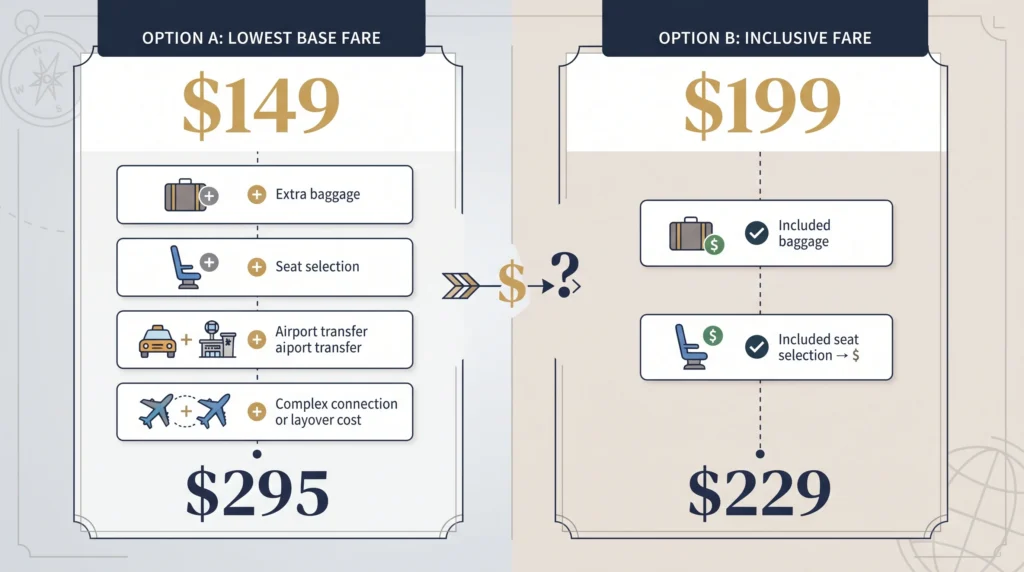
Compare the Real Cost of the Flight
For a budget traveler, this is one of the most important steps.
Use this formula:
Real flight cost = airfare + bags + seats + airport transport + connection costs
| Cost | Flight A | Flight B |
|---|---|---|
| Base airfare | $180 | $260 |
| Baggage | $45 | Included |
| Seat | $35 | Included |
| Extra airport transport | $50 | $0 |
| Real total | $310 | $260 |
The lesson: The $180 ticket looks cheaper, but Flight B costs $50 less once the real trip costs are included.
Flight B may actually be cheaper overall.
Airfare is only one part of your total trip budget. Our guide to hidden travel costs covers other expenses that can make a cheap trip more expensive.
Google also notes that additional charges such as baggage or payment fees may apply beyond the displayed airfare. Google Help
Google Flights Mistakes That Can Cost You Money
The biggest mistakes usually come from focusing only on the first price shown.
Searching only one airport can hide cheaper options.
Using fixed dates too early can hide cheaper days.
Ignoring baggage can make Basic Economy expensive.
Choosing the Cheapest tab without reading the itinerary can create self-transfer problems.
Ignoring airport location can also create false savings.
A $60 airfare saving means little if the cheaper airport adds $100 in transport costs.
For more ways to reduce costs across your whole trip, see our budget travel tips guide.
Which Google Flights Strategy Should You Use?
| Your Situation | Google Flights Tool to Use |
|---|---|
| Dates flexible | Dates + Price Graph |
| Destination flexible | Explore |
| Dates and destination flexible | Explore + Flight Deals |
| Dates fixed | Price Tracking + Nearby Airports |
| Traveling with bags | Bags Filter |
| Lowest fare is the priority | Cheapest |
| Convenience is the priority | Best |
| Visiting several cities | Multi-City |
| International trip | Multi-Airport + Multi-City |
This is the key idea:
Use Google Flights based on what is flexible in your trip.
Do not use every tool just because it exists.
Frequently Asked Questions
Is Google Flights free?
Yes. You can search and compare flights without paying Google a search fee.
Can I book through Google Flights?
Google Flights mainly helps you find and compare flights. You are usually sent to an airline or travel partner to finish the booking. Google Help
How do I track prices?
Search your route and turn on Track prices. You can track your dates, a specific flight, or Any Dates if you are flexible. Google Help
What is Google Flights Explore?
Explore helps you compare possible destinations when you have not decided exactly where to go.
What is the Cheapest tab?
It prioritizes lower fares. Some options may involve self-transfers, different airports, or other trade-offs. Google Help
Does Google Flights show every airline?
No. Google works with more than 300 partners, but not every airline or flight is included. Google Help
Is Google Flights good for finding cheap flights?
Yes. It becomes much more useful when you combine flexible dates, nearby airports, the Price Graph, Explore, baggage filters, and price tracking.
Final Thoughts
Learning how to use Google Flights is not about finding one secret trick that always gives you the cheapest ticket. It is about comparing flights more carefully and knowing which tools to use for your situation. From comparing different Google Flights scenarios, one lesson stands out: the lowest fare on the first search is not always the best deal. Checking nearby dates, alternative airports, baggage costs, and price trends can completely change which flight offers the best value. This is why I prefer a comparison-first approach instead of booking based on the headline price alone.
Based on the comparison process explained in this guide, the best approach is to check flexible dates and airports, use the Price Graph, compare Best and Cheapest options, include baggage and transport costs, and track prices when you are not ready to book. Most importantly, judge a flight by its total cost and convenience, not only the airfare shown on the screen. This approach helps you avoid false savings and make a more informed booking decision.

WRITTEN BY
Maya Carter
Maya Carter is the pen name used by WanderClarity’s site owner. The site focuses on practical destination guides, trip budgeting, and affordable travel planning.