

A travel budget template gives you one place to organize what you expect to spend, what you have already committed to, and what you actually pay during a trip. Instead of keeping flight prices in one note, hotel costs in booking emails, and daily expenses somewhere else, you can track the financial side of your trip in one clear system.
The most useful approach is Estimate → Confirm → Spend → Adjust. First, estimate your trip costs. Then replace those estimates with confirmed booking prices, record actual spending as the trip happens, and adjust what remains. This helps you see not only what you have spent, but also what you can still afford.
Download the Travel Budget Template
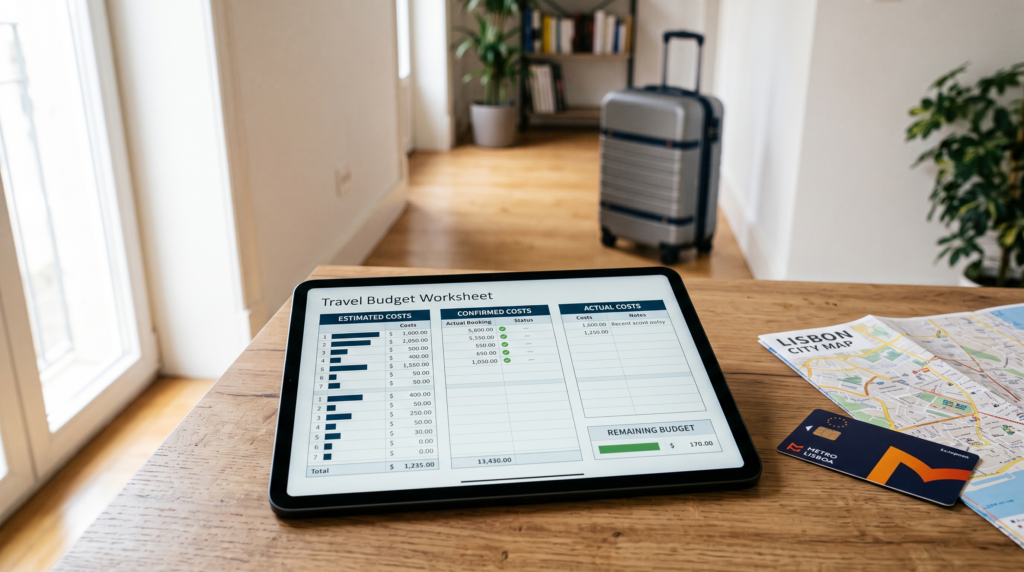
This is an Excel .xlsx workbook. It has not been tested across all Excel versions or in Google Sheets. If you import it into another spreadsheet app, review its formulas and formatting before relying on the results.
What Is a Travel Budget Template?
A travel budget template is a worksheet for entering trip details and tracking estimated, confirmed, and actual costs. This workbook also calculates forecast totals, forecast headroom, actual spending, and unspent budget using the definitions shown on the sheet.
What Should a Travel Budget Template Include?
You do not need dozens of tabs or complicated formulas. A good template should make your trip easier to manage.
Trip Details
Start with basic information such as:
- destination
- travel dates
- number of travelers
- trip length
- total available budget
These details give the rest of your budget context.
Travel Expense Categories
Your template should include the major costs that affect most trips:
- flights or main transportation
- accommodation
- local transportation
- food and drinks
- activities and attractions
- travel insurance
- visa or document costs where relevant
- mobile data or roaming
- baggage and flight add-ons
- shopping
- tips
- miscellaneous expenses
Remove or rename categories that do not apply to your trip.
Estimated, Confirmed, and Actual Costs
These three columns are the core of the system.
They help you see how each cost changes from early planning to the final amount paid.
Expense Tracking
During the trip, it can help to record:
- date
- expense
- category
- amount
- payment method
You do not need to track every cent. Record enough detail to understand where your money is going.
Budget Summary
A clear summary should show:
- total budget
- estimated trip cost
- confirmed commitments
- actual spending
- budget remaining
The goal is to understand your position quickly without checking every row.
How the Travel Budget Template Works
Use the template in four stages:
Estimate → Confirm → Spend → Adjust
Each stage answers a different question.
Step 1: Estimate Your Travel Costs
Before booking, research what the major parts of your trip are likely to cost.
For example:
| Category | Estimated Cost |
|---|---|
| Flights | $550 |
| Accommodation | $900 |
| Local Transport | $200 |
| Food | $400 |
| Activities | $250 |
| Estimated Total | $2,300 |
At this stage, the numbers do not need to be exact.
They are there to answer:
Can I realistically afford this trip before I start booking it?
If the estimated total already exceeds your available budget, it is easier to adjust the plan before committing money.
You might:
- travel for fewer days
- choose different dates
- use cheaper accommodation
- reduce optional activities
- choose another destination
For the full budgeting process, see How to Create a Travel Budget.
Step 2: Add Confirmed Booking Costs
Once you make a booking, you know more than you did during the research stage.
Suppose you estimated:
Flights: $550
but later booked them for:
$485
Keep both numbers.
| Expense | Estimated | Confirmed |
|---|---|---|
| Flights | $550 | $485 |
| Accommodation | $900 | $840 |
That difference matters because a trip can look affordable during research but change as real booking prices replace estimates.
Step 3: Record Your Actual Spending
Your final cost can still differ from the confirmed amount.
For example:
Accommodation
- Estimated: $900
- Confirmed: $840
- Actual: $875
The final amount may change because of taxes, optional add-ons, booking changes, or other charges connected with the original expense.
The purpose is not to make every estimate perfect.
It is to understand:
What changed between the plan and reality?
That information can help during the current trip and when planning future travel.
Step 4: Adjust the Remaining Budget
Once actual spending begins, your template becomes more than a record.
It becomes a decision tool.
Use:
Unspent Budget = Available Budget − Actual Spending Recorded
$2,500 − $1,600 = $900 unspent (unpaid commitments may remain)
Now ask whether that $900 is enough for everything still ahead.
If one category costs more than expected, you may need to reduce spending somewhere else.
Estimated vs Confirmed vs Actual Travel Costs
For this template, costs are tracked in three practical stages: Estimated, Confirmed, and Actual.
| Stage | What It Means | Example |
|---|---|---|
| Estimated | What you expect the expense to cost | Hotel may cost $900 |
| Confirmed | Price once booked or committed | Hotel booked for $840 |
| Actual | Final amount you paid | Hotel ultimately cost $875 |
Each stage serves a different purpose.
Estimated costs help you decide whether the trip looks affordable.
Confirmed costs show how much money is already committed.
Actual costs show what the trip really cost.
A basic Budget vs Actual spreadsheet skips the middle step. In travel planning, that step matters because many major costs are booked before departure.
Travel Budget Template Categories to Use
Start with broad categories that are easy to maintain.
| Category | Examples |
|---|---|
| Main Transportation | Flights, trains, intercity buses |
| Accommodation | Hotels, hostels, vacation rentals |
| Local Transportation | Metro, bus, taxi, rideshare, rental car, transfers |
| Food & Drinks | Meals, snacks, drinks |
| Activities | Tours, museums, attractions, events |
| Travel Documents | Visa and relevant document costs |
| Insurance | Travel insurance |
| Connectivity | SIM, eSIM, roaming |
| Flight Add-Ons | Baggage, seat selection |
| Other | Shopping, tips, miscellaneous costs |
You may also keep a separate contingency amount for expenses that cannot be predicted precisely.

However, do not hide known costs inside contingency money.
If you already know you will need:
- checked baggage
- airport transportation
- mobile data
- parking
- tolls
include those costs in the main budget.
For more examples, see Hidden Travel Costs.
How to Use a Travel Budget Template Before Your Trip
Before departure, use the template as a planning tool rather than only an expense tracker.
A simple order is:
- Enter your total available budget.
- Add your destination and travel dates.
- Estimate major fixed costs.
- Estimate flexible daily costs.
- Add confirmed prices as you book.
- Check how much money remains.
- Adjust optional spending if necessary.
Start With Major Costs
Begin with the expenses that are likely to use the largest share of your money:
- flights or main transportation
- accommodation
- insurance where relevant
- visa or document costs
Once these become confirmed, you will have a much clearer picture of what remains.
Then Estimate Flexible Spending
Next, estimate:
- food
- local transportation
- activities
- shopping
- small daily expenses
These categories are often easier to adjust than flights or accommodation.
How to Track Expenses During Your Trip
Once the trip starts, record actual spending regularly enough for the numbers to remain useful.
A simple expense log might look like this:
| Date | Expense | Category | Amount |
|---|---|---|---|
| June 5 | Airport train | Local Transport | $18 |
| June 5 | Dinner | Food | $32 |
| June 6 | Museum ticket | Activities | $24 |
| June 6 | Coffee | Food | $6 |
You do not need to turn your vacation into accounting homework.
The purpose is to catch overspending while you still have time to respond.

Check Your Remaining Budget
Use:
Forecast uses actual when entered; otherwise confirmed; otherwise estimated. These stages are alternatives and are not added together. Forecast headroom is available budget minus forecast total. Unspent budget is available budget minus actual spending recorded so far; unpaid commitments may remain.
If your available budget is $2,500 and actual spending recorded is $1,950:
$550 unspent; unpaid commitments may remain.

Now compare that $550 with the expenses still ahead.
Check Your Remaining Daily Allowance
For flexible spending, you can also calculate:
$480
4
That does not mean you must spend exactly $120 every day.
It gives you a useful average for deciding whether your remaining plans are realistic.
For the full method, see How Much Should You Budget Per Day for Travel?
Travel Budget Template Example
Illustrative calculation only—not a current destination-price estimate: suppose a 7-day trip has a total budget of $2,500.
The figures below demonstrate how estimated, confirmed, and actual amounts can differ.
| Category | Estimated | Confirmed | Actual |
|---|---|---|---|
| Flights | $550 | $500 | $540 |
| Accommodation | $900 | $850 | $875 |
| Local Transport | $200 | $180 | $195 |
| Food | $400 | — | $420 |
| Activities | $250 | $220 | $230 |
| Other | $200 | — | $175 |
| Total | $2,500 | — | $2,435 |
The example also shows why tracking several stages is useful.
Flights were expected to cost $550, booked for $500, and eventually cost $540.
Accommodation was estimated at $900 but ended at $875.
Food went over the original estimate.
Looking only at the final total would hide those differences.
Using the Travel Budget Template in Excel or Google Sheets
You do not need a different budgeting method for each spreadsheet program.
The important part is the structure of the template.
The download is an Excel .xlsx workbook. Its formulas and formatting may differ in another spreadsheet app; review them after importing.
The budgeting system itself remains the same:
Estimate → Confirm → Spend → Adjust
Use the spreadsheet program that is easiest for you to maintain consistently.
Travel Budget Template for Couples and Families
One shared budget can work well for couples, families, or small groups.
You may want to add a simple Paid By field to the expense log.
For example:
| Expense | Amount | Paid By |
|---|---|---|
| Hotel | $850 | Maya |
| Airport transfer | $45 | Alex |
| Museum tickets | $80 | Maya |
This helps you see who paid for major expenses.
However, avoid turning a simple travel budget into a complicated group-settlement system unless you actually need one.
The main purpose is still to track the trip’s total cost.
Common Travel Budget Template Mistakes
Tracking Only Actual Spending
If you only record expenses after they happen, the spreadsheet becomes an expense history rather than a planning tool.
Keep:
Estimated → Confirmed → Actual
so you can use the budget before and during the trip.
Forgetting Small Travel Expenses
Common examples include:
- baggage
- transfers
- mobile data
- parking
- tips
- small transportation costs
One small charge may not matter much, but several can affect the total.
Creating Too Many Categories
More detail is not always better.
If you create separate categories for breakfast, lunch, dinner, coffee, snacks, and every other purchase, you may stop updating the spreadsheet.
Use categories that help you make decisions.
Not Updating Confirmed Prices
Once a booking is made, update the sheet.
Otherwise, you may continue making spending decisions using an estimate that is no longer useful.
Ignoring the Remaining Budget
Tracking spending without checking what remains defeats much of the purpose.
Your spreadsheet should help answer:
What can I still afford?
not only:
What have I already spent?
How This Travel Budget Template Fits Into Your Trip Planning
A template organizes your numbers. It does not need to explain every part of travel budgeting.
Use your other planning resources when you need more detail:
How to Create a Travel Budget
Use this when you need to build your overall trip budget from the beginning.
How Much Should You Budget Per Day for Travel?
Use this to calculate and adjust daily spending.
Hidden Travel Costs
Use this to identify expenses that are easy to overlook.
Travel Planning Checklist
Use this to organize the wider planning process beyond money.
Keeping these jobs separate makes each resource easier to use.
For a trip-specific planning workflow, continue with the Trip Budget Planner.
Download the Travel Budget Template
Use the template to organize your trip through four stages:
Estimate → Confirm → Spend → Adjust
It can help you:
- plan trip costs
- record confirmed booking prices
- track actual spending
- organize travel expense categories
- monitor your remaining budget
- review your spending after the trip
Before relying on any spreadsheet version, review its formulas and fields and adjust the categories to match your trip.
Frequently Asked Questions
What Should a Travel Budget Spreadsheet Include?
A useful travel budget spreadsheet should include your total budget, travel categories, estimated costs, confirmed booking costs, actual spending, and remaining budget. A daily expense log can also help you monitor spending during the trip.
Should I Track Estimated and Actual Travel Costs?
Yes. Estimated costs help you plan before booking, while actual costs show what you finally spent. Tracking confirmed booking costs between those stages can give you a clearer view of money you have already committed.
How Do I Calculate Forecast Headroom and Unspent Budget?
Use:
Forecast Headroom = Available Budget − Forecast Total
Unspent Budget = Available Budget − Actual Spending Recorded
If your available budget is $3,000 and actual spending recorded is $2,100, you have:
$900 unspent; unpaid commitments may remain.
Can I Use a Travel Budget Template in Google Sheets?
You may try importing the .xlsx workbook into Google Sheets; compatibility has not been comprehensively tested. Review formulas and formatting after import before relying on the results.
Can I Use a Travel Budget Template in Excel?
The download is an Excel .xlsx workbook. It has not been tested across all Excel versions. Review formulas and formatting in your version before relying on the results.
How Often Should I Update My Travel Budget?
Update the template when major booking prices become confirmed and often enough during the trip for the remaining-budget figure to stay useful. You do not need to follow a strict daily schedule if another routine works better for you.
What Is the Difference Between a Travel Budget and a Travel Expense Tracker?
A travel budget looks forward as well as backward. It helps you plan expected costs and manage the money available. An expense tracker mainly records money after you spend it.
Final Thoughts on Using a Travel Budget Template
A travel budget template should make the financial side of travel easier to understand, not create more work. Keep the categories simple, update major costs as they move from estimates to confirmed bookings, and record enough actual spending to know where your money is going.
Treat the template as a living budget: Estimate → Confirm → Spend → Adjust. Update it when booking prices become known and as actual expenses replace your estimates. That way, the spreadsheet does more than record what you spent—it helps you see what you can still afford while the trip is being planned and taken.

WRITTEN BY
Maya Carter
Maya Carter is the pen name used by WanderClarity’s site owner. The site focuses on practical destination guides, trip budgeting, and affordable travel planning.